

If you have a bank account, chances are you have received messages like “Please update your KYC” or “Your KYC is due for renewal”. Many people wonder why banks keep asking for KYC again and again. Isn’t once enough?
To answer this, let’s break it down step by step in simple language.
What is KYC?
KYC stands for Know Your Customer. It is a process introduced by the Reserve Bank of India (RBI) where banks are required to identify and verify their customers before and during the relationship.
KYC involves checking your:
- Proof of Identity (PoI) – like Aadhaar, PAN, Passport, Voter ID.
- Proof of Address (PoA) – like Aadhaar, utility bill, driving license, passport.
- Other details such as occupation, income, and source of funds.
The idea is simple – banks must know who their customers are. This protects both the bank and the customer.
What is Customer Due Diligence (CDD)?
You might also hear the term Customer Due Diligence (CDD). It simply means that the bank must verify the customer and, if applicable, the beneficial owner (the actual person behind the money) using reliable, independent, and authentic sources.
So, whether you open a new account, update your details, or reactivate an old account, the bank needs to perform CDD as per RBI rules.
Why Do Banks Frequently Ask for KYC?
There are several important reasons why banks request KYC updates again and again:
- Regulatory Compliance – RBI mandates periodic KYC updates. For low-risk customers, banks must update every 10 years, while for higher-risk customers, it can be as frequent as every 2 years and for medium-risk customer it is 8 years.
- Fraud Prevention – Regular KYC updates help banks detect and prevent fraud, identity theft, or money laundering.
- Changes in Customer Information – If you shift houses, change jobs, update your mobile number, or your income changes, banks need to reflect these in their system.
- Inactive Accounts – If your account has been inactive, the bank may ask for KYC before allowing new transactions.
- Central KYC (CKYC) Registry – Banks also sync customer data with the central registry to avoid duplication and ensure accuracy.
In short: Banks are not trying to trouble you. They are following RBI’s safety rules to keep your money and identity secure.
Different Ways to Update Your KYC
The good news is that updating KYC has become easier with digital options. You don’t always need to go to the branch. Let’s look at the different ways you can update KYC in State Bank of India (SBI).
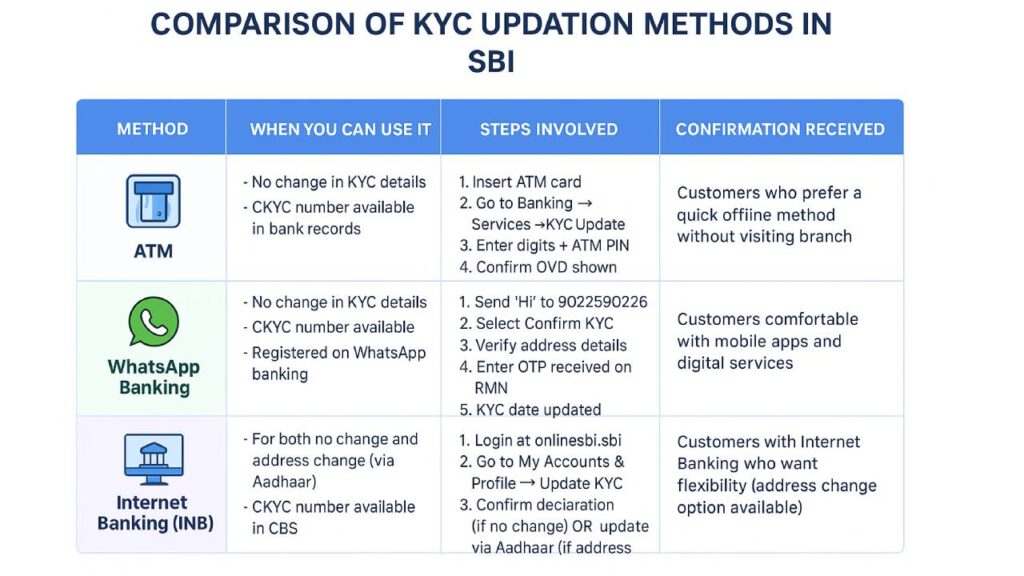
1. KYC Updation through SBI ATM
This is a quick way if there is no change in your existing KYC details and your CKYC number is already available with the bank.
Steps:
- Insert your SBI ATM card.
- Go to Main Menu → Banking → Services → KYC Update.
- The machine will ask you to confirm by entering two digits and your ATM PIN.
- You will see your Officially Valid Document (OVD) details on screen. Confirm if correct.
- Accept the Terms & Conditions.
- Submit your request.
You will receive a confirmation SMS once your request is processed.
If your CKYC number is missing or your details don’t match, you will be asked to visit the branch.
2. KYC Updation through WhatsApp Banking
SBI also allows customers to update KYC using WhatsApp – but only if there is no change in your KYC information.
Step 1: Register for WhatsApp Banking
You can register in four ways:
- Via SMS – Send WAREG <Account Number> to 7208933148.
- Via WhatsApp OTP – Send Hi to 9022690226 and follow instructions.
- Via YONO App – Login, choose WhatsApp registration, and validate with OTP.
- Via YONO Lite/Online SBI – Select WhatsApp registration and validate with OTP.
Step 2: Update KYC
- Send Hi to SBI’s WhatsApp number 9022690226.
- Choose Confirm KYC.
- Verify your address details.
- Enter OTP received on your registered mobile number.
- Your KYC date will be updated.
You will also receive a confirmation message like:
“Dear Customer, KYC details for your A/C XX1234 have been updated in Bank’s record through WhatsApp Banking on DD/MM/YYYY. Thank you for banking with us.”
3. KYC Updation through Internet Banking (INB)
Another convenient option is updating KYC through OnlineSBI.
(i) If there is no change in your KYC details:
- Login to onlinesbi.sbi.
- Go to My Accounts & Profile → Update KYC.
- Select your account (only single-operated accounts are allowed).
- Update income/occupation details if needed.
- Tick the declaration that details are correct.
- Enter OTP received on your mobile.
- You will get confirmation: “Your KYC has been updated successfully.”
(ii) If you want to update your address using Aadhaar:
- Follow the same steps as above till the address update option.
- Select Yes for address update.
- Enter your Aadhaar number.
- Enter OTP received on Aadhaar-linked mobile.
- The system will fetch your address from UIDAI database.
- Verify and confirm.
- Enter final OTP from Internet Banking.
- A confirmation message will be displayed.
This method ensures your Aadhaar-linked address is automatically updated in your bank account.
Why You Should Not Ignore KYC
Some customers think KYC updates are unnecessary and ignore reminders. But that can cause issues like:
- Transactions may be blocked.
- Accounts may become inactive.
- You may face delays in availing loans, cards, or new services.
- High-value transactions could be flagged without updated KYC.
Updating your KYC on time saves you from inconvenience and ensures smooth banking services.
Conclusion
Banks frequently ask for KYC because it is mandatory under RBI rules and essential for your own safety. With increasing frauds, cybercrime, and money laundering risks, keeping customer records updated is a must.
Thankfully, banks like SBI now provide multiple easy ways to update KYC – through ATMs, WhatsApp Banking, Internet Banking, and of course, by visiting the branch when necessary.
So, the next time you receive a KYC reminder from your bank, don’t ignore it. Take just a few minutes to update it through the available channels. This small step will keep your account active, secure, and hassle-free.
Key Takeaway: KYC is not a burden, it is a protection shield for both you and your bank.